
Know what's on the shelf before you call town.
Stock by rig with minimums and bins, Order Lists approved by PIN and sent to each supplier, deliveries received into stock, and R&M spending tracked against the budget.
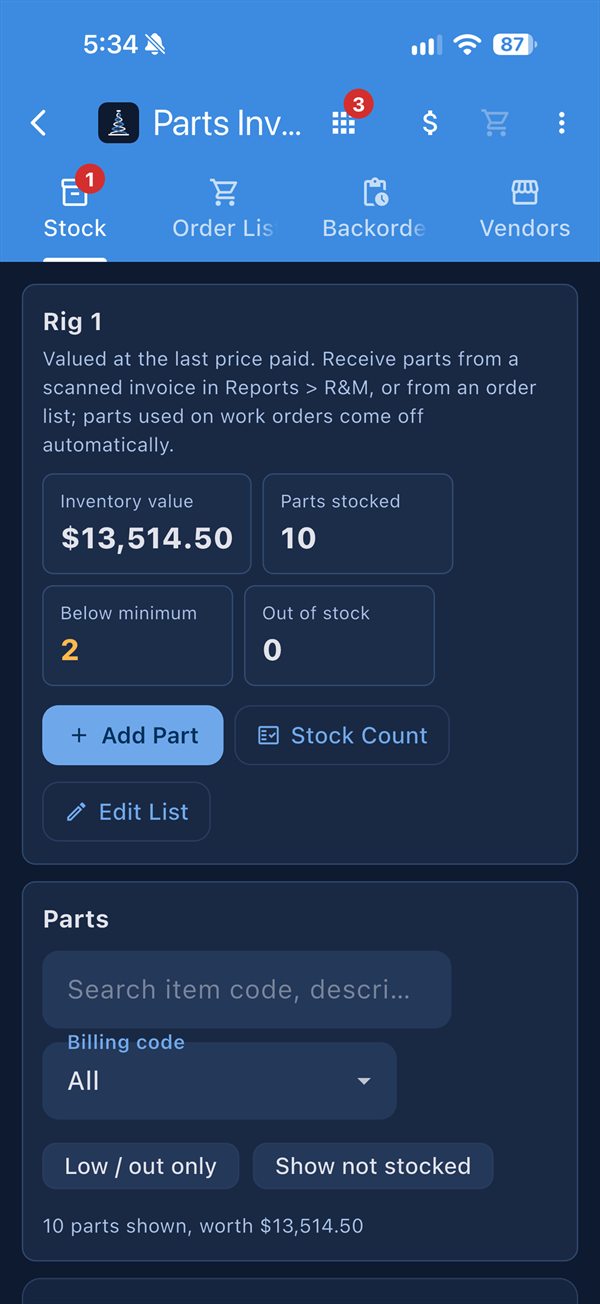
The whole parts cycle, in one place
On paper
- Counting shelves by hand to find out what's low
- Order lists texted, emailed and lost
- Calling the supplier to ask where a part is
- Invoices in a pile on the Rig Manager's desk
- Finding out you're over budget at month end
With RigDNA
- Low stock flagged, and a reminder when nothing is on order
- Order Lists approved by PIN, then each supplier gets only their lines
- Confirmations, shipments and backorders show on the rig's own order
- Invoices read by AI, then stamped and approved by PIN
- R&M against the yearly budget, with a projected year-end
Every part, every bin, every rig
One parts catalog for the company, with each rig keeping its own minimums, locations and stock, valued at the last price paid. Every movement is logged with who made it, and a shelf-by-shelf count shows the differences and their value before you save.
- Groups, billing codes and low or out-of-stock filters
- Edit many parts at once in a table
- Parts used on work orders come off by themselves
From low stock to delivered
Fill an Order List from the cart, by hand with photos for the supplier, or with "Add everything below minimum." The approver can trim quantities or lines, then approve by PIN or send it back with a reason. Each supplier gets only their own lines, emailed as a PDF under the rig's name.
- Suppliers on RigDNA answer each line, and the rig sees it
- Receive in full or in part, and backorders follow to the next order
- Replies go to the rig's own email
Snap the invoice, and it fills itself in
Scan up to 20 invoice PDFs or photos at once and the R&M form fills itself in, with a warning on duplicate invoice numbers. Push the invoice's part lines into inventory to update prices and stock. Track spending against the yearly budget by billing code.
- Rig Managers stamp and approve supplier invoices by PIN, or dispute a single line
- A Re-Bill stamp emails the invoice to accounts payable
- Export R&M as PDF or Excel
A part, start to finish
- LowIt drops below minimum, and someone is reminded if nothing is on order.
- OrderedOn an Order List, approved by PIN, sent to each supplier.
- AnsweredConfirmed, backordered or shipped, shown on the rig's order.
- ReceivedInto stock, in full or in part, signed for by PIN.
- InvoicedRead by AI, stamped by the Rig Manager, counted in R&M.
The parts crews talk about
Invoices read by AI
Photos or PDFs become R&M entries and inventory updates in seconds.
Every supplier, their own lines
One approved Order List splits itself by supplier, emailed under the rig's name.
Counts and orders without signal
Stock changes and Order Lists save on the device and sync later.
What Parts & Ordering does
- Rig stock by location and bin, with minimums, groups, billing codes and value
- Stock log of every movement and who made it, with earlier prices kept
- Shelf-by-shelf counts with differences and value before saving
- Company parts catalog shared across rigs
- Order Lists from the cart, by hand with photos, or everything below minimum
- PIN approval with trim, send back and reasons
- Supplier emails with only each supplier's lines, from the rig's name
- Receiving and backorders, in full or in part
- R&M against a yearly budget, by billing code, with PDF and Excel export
- AI invoice reading (optional), with duplicate warnings and inventory updates
Part of one app
Every module shares the same people, rigs, PIN signatures and offline sync, so records connect without double entry.
For Suppliers
Orders straight from the rig, inventory and barcodes, and invoices the rig approves.
See For SuppliersMaintenance
Planned maintenance, work orders, assets, certificates and transfers between rigs and the yard.
See MaintenanceReports & Rig Data
Relief notes, downtime, R&M costs, pump hours, ton-miles, tallies and a grade for every rig.
See Reports & Rig DataSee it with your own forms
Tell us about your rigs and we'll walk you through Parts & Ordering with your own forms, people and parts in it.